Showing posts with label Step by Step. Show all posts

Friday, November 4, 2011

Painting Chaos Space Marine Glowing Eyes Step by Step With GW Color Reference

Before you start, you actually need :
1.) Any two tone color, one deeper, one lighter, and also, the most important, skull white.
2.) A fine detail brush, I'm using 000 and 5/0 (I guess it stand for 00000) brush in the guide

This is actually a very basic guide for painting chaos space marine's eyes, I'm going for a glowing kind of effect here... it could be done in a relative short time, I've taken all the pictures while painting in less than 20 minutes time.

I'll be using three type of colors for the guide below : blue, red and green (which I think should suits chaos space marine quite well =P)


As usual, prime black (I've thrown in a bit of Cheradon Granite to the mix)


Go for the "deeper" color using 000 brush, you can actually go pretty sloppy on this stage, a bit color that goes out of column is totally fine.


Now, using the finer detail brush to paint the "lighter" color, be careful and try not to spread the color out of column this time. Selectively pick out the area that you want it to looks more glowy

Last step, use your finer brush to get just a tip of skull white, and highlight the area that you want it to looks like glow. And off we go, voila, your chaos space marine are now having glowing eyes. 

Tips: for applying skull white, just gently brush the white color off on the eye using your brush tip, don't press it too hard (or else the white will be very concentrate and looks dull, the key is : SPREAD AND GENTLY BLEND THE WHITE INTO THE COLOR BENEATH IT), I've found that using this way, you could control the brightness of both eyes, and make it more or less even. It took a few practice to get it right, but it ain't rocket science ;-)

You might ask, how much is "a tip of skull white"... below are the example for your reference...
note that this is actually on a 00000 brush, which basically is just a wee bit.

ps: Don't be afraid if you accidently goes out of column on any stage, you can always cover it up with base color or color on previous stage and go all over again, the eyes is actually tiny, it won't take you too much time to repaint =)

ps2: If you are lazy and wanna do it in two stage, it can be done too, just skip step 2 (the "lighter" color part) and go directly to skull white, truth be told, the different won't be too obvious on a tiny plastic head =__,= (you lazy bugger)

Have fun painting folks! 


Sunday, July 17, 2011

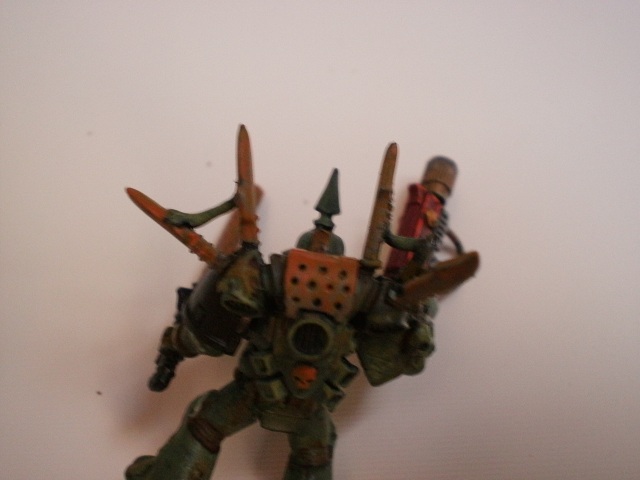
Painting Plague Marine Step-By-Step with GW color scheme.

A.K.A Ork wannabe marine.

1.) Base Coat Chaos Black (No pic, I forgot to take photo on this step as this had been done weeks ago..)
2.) Base color : 2 part shadow grey  with 1 part sunburst yellow:
 (Oooookey, I'm trying to save some money by mixing color... normally I guess folks will just use Catachan Green directly)


3.) Camo Green on places that will catch the light, for me, I assume the light source hit from above the mini


4.) Ogryn Flesh wash over the "joint" area and selective area that you see fit. I've go for the join area of armor, any area that suppose to have some shadow, the crack, and some on the camo green part to tone it down abit.


5.) Wait for last wash to be completely dry, apply Gryphonne Sepia wash (I've tried to apply ogryn twice, the effect is just no as obvious, Gryphonne is more brownish and closer to my ideal color...)


6.)Watered down Snakebite Leather (2 part water 1 part snikebit) on lower legs, undiluted snakebite for all the tubes, for some yellowish rusting effect.


7.) Three part Snakebite Leather one part Blazing Orange, to highlight the tubes and add the depths of the rusting effect. Beware, blazing orange is a pretty bright color, don't over do it.


8.) Rotting Flesh, highlight the edge


(I found that I got carried away and overdid the the rotting flesh part, so I add some lspot on the belly with sepia wash again....)


9.) Base coat the guts with Mechrite Red, wait for it to dry, then apply some watered down Snakebite Leather (2 part water 1 part snakebite)


10.) Meltagun : Scab Red, Blazing Orange edge highlight (bad day, very shaky hand), Chainmail and Shining Gold on the barrel and the other part of the gun.


For all the spike on the backpack and also the chainsword, I want to make it look like rusted metal (still cant get it right at the moment, you can ignore the part below and look for other rusting effect tutorial)


11.) Graveyard Earth on all the spike and the upper part of backpack.


12.) Snakebite leather on the part the the light suppose to hit on


13.) 1 part Snakebite 1 part Blazing Orange, it *suppose* to look like rust, but cant get it right...


14.) Touch up abit here and there, paint the eye. Voila, the ork wannabe is done.